What Makes A Successful CRM Project?

The answer? Well, in truth, this is no single right answer. Often each department, or even individual will have their own idea of what a successful CRM project look like for them.However, what fascinates me is that so many companies often embark on large scale CRM projects without taking the time to truly outline what will be viewed as success. The management team see a business issue, perhaps relating to cost or efficiency, and jump for a quick "fix". "Hey, everybody is using this CRM thingy....we should do that!". The only trouble is that partner's are enlisted, budgets agreed and scope documents signed off before anyone has actually asked "Why do we actually need this again?".
This probably sounds very much like an odd thing to say for a CRM Consultant who spends his life encouraging people to implement CRM. However, implementing it for the right reasons, with clear business objectives is essential. Only then can you truly define true success, see measurable improvements and significant ROI.
What does failure look like? Now that's a different story! Everybody has clear in mind what failure is (Going over budget, missing deadlines...) but that too is often very subjective and is often nothing to do with the objectives of the project. So, without getting any more philosophical, what can an organisation who is implementing a CRM solution do to ensure that their project is successful?
Take Your Time
I chaired a discussion with over 30 delegates at a UK Housing Association conference last week on implementing CRM. When asked what they wanted to get out of our session, one delegate commented "To get it right first time with our CRM deployment".....Good answer
The only way to achieve this is to take your time in the first stages of any project. Rather than coming out of the meeting where you have identified your issue, reaching for Google and searching for CRM companies, take the time to really think about what the issues you are facing are. Identify the issues clearly and the solutions become more defined. Then, document what you would like to achieve from deploying a CRM solution, even writing a list of 2-3 key bullets of what are must-haves for the project to be a success.
Reaching back for Google yet? Hold on! Take the time to think about the wider business. If you are going to invest the time money and effort into a CRM project, why not see what else you can achieve whilst doing it? Can you bring teams that are working in disparate systems together and enable information sharing? Can you drive efficiency in areas that perhaps you would not expect (i.e warehouse, accounts dept...). Doing all of this takes time, time you may not think you have. But take it from one who has seen CRM projects rushed through by managers desperate to resolve their issues, if you don't take your time, you will pay the price down the line.
The time spent at this stage will save days even weeks of time resolving issues during or even after go-live.
Establish A Project Team

But who should make up this team? Your first inclination may be to involve all the people who have been involved in your discussions so far, or people who agree with your view on things. This is not always the best selection criteria and really any project team should be balanced. Your project team should have people from all areas and levels of the business with varying experience. Fresh ideas can come from the most unlikely of places. At a high level any project team should have:
A strong, driven Project Lead - This individual will be the first to read the documentation cover to cover and the last person to leave the night before go-live. They will get to know the system and therefore your business process inside out. They need to have the skills to draw out of people what they need and the strength to say no when asked for things that could derail the project. Clearly, this person is the most important member of the team and wouldn't normally be a member of senior management (trust me, you wont have the time)
At least 2 members of the senior management team as Project Sponsors. There is nothing more frustrating for this team of individuals who are working hard to make the system a success if there is no buy-in, perceived or actual, from the people at the top. They need to know that their hard work, often on-top of what they do as a day job, will not be for nothing. The individuals chosen to fulfill the project sponsor role must also have a key quality: They must actually care about and be invested in the project aims. I mean no offence, but there is no point in asking the VP of manufacturing to do this if the project will not impact his area of the business in anyway. In addition, even though as senior management they will be extremely busy, they must commit to attending the project meetings. This is crucial if the project is to be a success.
Project Champions from each affected department. These also must be chosen carefully. You are looking for people who are "up for it" and willing to really get stuck in and provide good feedback. These individuals need to know the processes carried out by their area of the business inside out as you need them to bring to the team all the scenario's and "What if's" that everyone else isn't aware of or would forget. In addition, really investing in these people, getting them involved in revisions of the scoping documentation and even asking them to sign-off the relevant parts will give your project a strong presence in each department meaning when things aren't going to plan post-deployment (which always happens no matter how good you are) your project lead isn't running around the building having a meltdown.
Getting the right people in place will be a major factor in a successful implementation.
Chose The Right Partner
Choosing the right consultant/organisation to handle your project is crucial. This person(s) is going to be your guide on so many things for what could be up to a year, the relationship needs to be strong. You need a partner who will support you through the changes that your business will go through during the project. You need a partner who will take the project as seriously and invest as much of themselves as you will. Obviously this comes at a cost, but a good partner can be worth their weight in gold.
 What should you look for? A good partner will have a strong track record of delivery and be willing to let you talk to previous clients. They should also be able to assign you a main contact who is technical, who you can bounce ideas off when you need. They should also be easy to get along with. I know that sounds strange, but you will be putting these people in front of a large proportion of your staff. They need to present a positive and supportive attitude and, where possible, be easy to engage with. Your not looking for a partner who wants to make a quick buck and run.
Your CRM partner will get to know your business processes better than you do and going forward as your business develops your solution can do so to with the support of a partner who knows you and your ethos.
Chose The Right Technology

So, how do you measure success in a CRM project? Actually, only you can answer that. However, what is clear is that answering that question, setting your critical success factors before you do anything else, is almost the answer itself.
xRM Consultant (UK) Ltd provide consultancy services in all areas of Microsoft Dynamics CRM Projects. If you would like to discuss your requirements please contact us - enquiries@xrmconsultant.co.uk
Joel
MS Dynamics CRM and Supporting Customer Processes - Disabling The Save Button On Duplicate Detection Window
Recently our customers have been looking into additional ways to customize Dynamics CRM 2011 to support the processes of their teams. For certain customers, those who have exhausted all the options of "supported customization's", this requires some creative thinking.

Its interesting as this desire for more quirky changes to Microsoft Dynamics CRM 2011 is really a product of its own flexibility. CRM 4, while great, was fairly static when it came to processes. A lot of companies used it as a CRM solution in the more classic sense. Then came the big moon step forward that was CRM 2011. This gave organisations so much more flexibility in integrating systems and supporting processes. Trouble is, you give a customer a slice and they want the whole cake! For customers who have now been working with and adapting Microsoft Dynamics CRM 2011 for the last 2-3 years, the desire for configuring Microsoft Dynamics CRM 2011 to support the ever changing and unique processes of their business sometimes goes beyond what is possible under the heading of "supported customisations". The answer? Microsoft Dynamics CRM 2013 of course!!

In the meantime, when it comes to these sort of requests, we have to get creative! In line with this we had a customer recently who wanted us to remove the Save Record button on the duplicate detection window. The inbuilt duplicate detection, whilst it has its limitations, nicely gives you the opportunity to not save your newly entered record if a duplicate is found. However, you are also given the option to save the record even if a duplicate is found. This causes a problem when you have a large team of users who, to be frank, you don't trust to allow the to create duplicates. Thanks to a very helpful blog post from MS Dynamics CRM 2011 Tips we were able to disable the Save Record button fairly simply by taking the following steps:
- Navigate to your CRM instance on your app server.
- Navigate to \CRMWeb\Tools\DuplicateDetection\ViewDuplicates\
- Edit this file in Visual Studio or Notepad.
- Add this line to the ShowPage() javascript member or any member that is called by onLoad(): document.getElementById("btn_id_Ok").disabled="true";
- Save your change.
This will disable the button. If you would like to get clever (like we did) you can add some further script to disable this button for users with a certain security role.
Nice little bit of code that can help with the usability of Microsoft Dynamics CRM 2011 in certain scenarios.
Thanks
xRM Consultant
Microsoft Dynamics CRM 2013 – The Next Step


The Story of the Import & The Inactive Record
Ok, so i was transferring a bunch of records with lookup field linked to contacts and accounts from an old CRM 4 deployment to our new CRM 2011 deployment. I was trying to do this the quick and easy way……exporting records to excel.
A large number of the records imported ok but a large number failed due to a “duplicate lookup reference exists". Now, this normally means, especially in the case of a contact record that you have 2 “John Smith” records and the import does not know which one to resolve the newly imported record too. However, i searched and only 1 John Smith record came up?!……
So, then i remembered that we had recently ran a duplicate contact clean-up job on our contact records using the de-dupe process to find the duplicates and merging the records together. So i searched for John Smith but this time i searched for both Inactive and Active records and voila! 2 records!
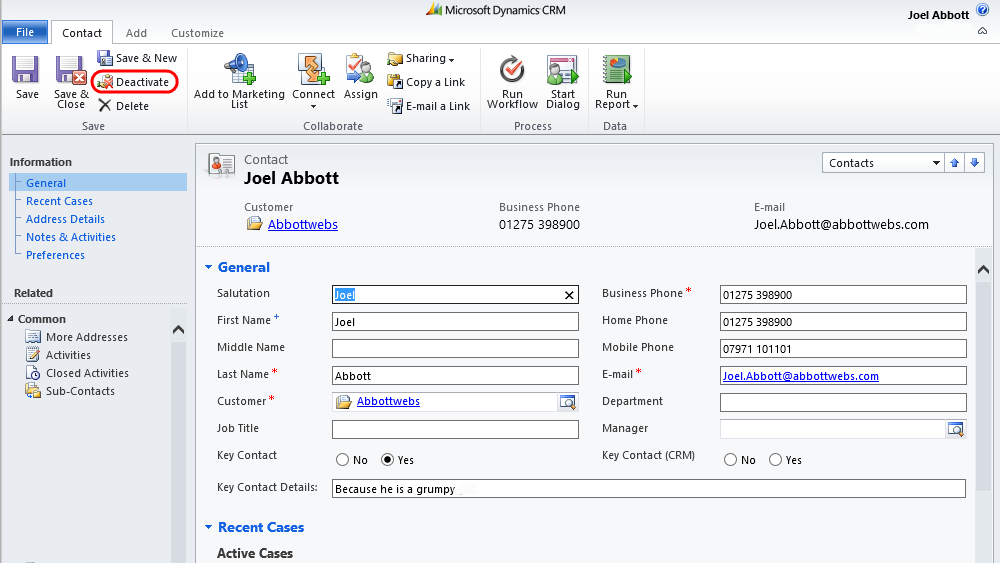
So, first point, by doing this i discovered that the when resolving lookup references, the import process includes deactivated records and as far as i can see there is no way to turn this feature off. So, after being mad at MS for a while, i eventually realised that actually this wasn't a bad idea, especially when migrating historical data. However, my issue was, how do i get around it?!
I realised that i needed to adjust the inactive contact records in such a way that they wouldn't be picked up by the import process which basically meant, changing the name on all the inactive records. But i also wanted to change it back again. So, i went for the following:
- Create 2 x new fields on the contact entity (don't have to put them on the form) called “Old First Name” and “Old Last Name”
- Wrote an OnDemand workflow that first of all, takes the values of the “First Name” and “Last Name” fields and populates them into the newly created fields above. The workflow will then clear the “First Name” and “Last Name” fields. This thus changes the full name to blank.
- Ran an advanced find to show all inactive contact records.
- Ran my workflow in step 2.
- Carried out my import (successfully as my newly imported records only resolved to active contacts)
- Wrote another workflow that takes the values of the “Old First Name” and “Old Last Name” fields and populates them into the “First Name” and “Last Name” fields. The workflow will then clear the “Old First Name” and “Old Last Name” fields. This thus changes the full name back to what it should be.
- Ran an advanced find to show all inactive contact records (again)
- Ran my step 6 workflow.
- If like me, you aren't bothered about changing the names of the deactivated contacts back from Blank you can stop at step 5
- If you wish to go through this process but only with a relevant sub-set of deactivated records you can obviously define this in the Advanced Finds (steps 3 & 7)
Ta
xRM Consultant
CRM 2011 Solutions – Problems & Best Practice
As you may (or many not) know i have been working on our largest CRM implementation which also happens to be out first large scale CRM 2011 implementation. As such, we have started working with solution files!

First of all, I would like to say that I really love the concept of solution files. Making changes for either support or development purposes on clients CRM systems in CRM 4 felt very clumsy and poorly controlled. The introduction of solutions dealt with this in a way that feels much more professional. However, the question arose, what is the best practice for using solutions?
The Problems
Surprisingly, i couldn't see many (if any) articles or details on this. So we started out by, on our development environment, creating a solution file using the client name and using the version number to control this. We added all the existing system components and made changes to these as we went along. However, the problem with this is that development felt a bit cumbersome. You couldn't use the native “Customise” tab on forms as this edited the default solution as well as the fact that all members of the team had to remember to stick to the solution only and not do this.We also had major issues when applying the solution that came from the way our solution was interacting with another managed solution. We installed our main solution on one of the clients servers after which, we installed the brilliant eCampaign (great email marketing extension for Dynamics CRM 2011) on the one of the clients servers. The problems started when we subsequently made changes (by creating another solution file) on this server.
When we tried to export our solution file, we were quite rightly warned that components were missing. So, we added the components. We did this until it appeared that all the required components (including those used by the managed eCampaign solution) were included. When we tried to import the solution into our Dev environment it failed because, you guessed it, we couldn't import components of a managed solution! So, we went back, removed all components of the managed solution, re-exported ignoring the warnings about missing components. When we tried to import it into our Dev environment………it failed because of missing components!!! The only “solution” was to edit the XML solution file, something we were very uncomfortable with at this stage.
Now, i know what your thinking. Why on earth are you developing on a client server!! And, to be honest your right. It was necessary at the time but bad practice which brings us back to what should be our future practice. For those of you interested, the way we got around the above situation was to ask the vendor (eCampaign) to uninstall the managed solution, export our solution file (which now no longer required the missing components) and reinstall the managed solution after.
The Best Practice (Well…according to me anyway)
So the moral of the story (or what we have learned so far is…)- Create a Deployment for your Client on your development environment
- Develop in the “Default Solution”.
- When ready to deploy on your client server, you have 2 choices:
- Export The Default Solution – If this is exported as managed, then when imported it will show as “Default Solution” in the clients list of installed solutions. If it is exported as unmanaged, it will overwrite the existing default solution and as such, wont appear in the clients list of solutions.
- Create A New Solution & Add The Relevant Components – When exported either as managed or unmanaged, it will show in the solution list.
- For small changes you also have 2 choices:
- Create A Single Solution File With Relevant Components – Create a solution file with a relevant name (i.e. ClientName Updates 2011) and add the relevant components. Every time the client wants changes made, create a solution with the same name but different version number on your Dev environment and when importing as a managed solution, it will update the existing solution. You can of course always do this with your solution file created in step 3 with the same results.
- Create Multiple Solution Files For Each Change Batch – Create a solution with a unique name and install on your clients environment.
- For major changes, i would go through step 3 again.
- When working with other managed plugins, always uninstall them from your Dev environment before exporting your solution.
Thanks
J
Set Default Activity Values – Duration, Date & Time
Ok, so first of all apologies for going quiet over the past few months! (Again!). I have just delivered the biggest CRM project that Chorus IT has ever delivered! This has been a huge success (with plenty lessons learned also!). Customer happy, seeing real tangible value and really excited about how MS Dynamics CRM 2011 is going to revolutionise their business.
As part of the development process, i have come across numerous interesting bits of JavaScript etc. that have helped me overcome certain issues and now we are coming to the conclusion of the project i will be blogging these over the coming weeks. I will also be thanking (if i can remember) those whose blog/tweets helped me come to the solutions i used along the way…
So, to begin… Setting Default Activity Values – Duration, Date & Time.
The system we built for our client is being heavily used to record activities for large sales teams. With a target of 100 calls a day in mind, any little pieces of data entry we could shave off would help hugely. One of these was the fact that every time they made a phone call they had to enter the duration (which on average was 2 minutes") and set the date and time to the current date and time.
Duration:
This was no where near as easy as i expected it to be. As you know, the duration field displays as an option set (dropdown) of values. As such you would think it would be easy to add values to this…………not so! This field is in fact a “Whole Number” field!
After very briefly considering editing aspx files etc, stumbled across a comment from Donna Edwards MVP that noted the fact that you can enter a numerical value in here. This got me thinking, rather than add the option to the list, could i simply populate it via JavaScript and allow the field to do its thing and display it correctly?
It worked!
I used the following JavaScript to populate the value (using a Whole Number of course) and had the following results…

Date & Time
In contrast with the above, this was much easier than i thought. I found a post of the website of the legendary Sonoma Partners that dealt with this for the specific circs I was looking for. It utilises the JavaScript Date() function to retrieve the current date and time and populate this in the relevant field as follows with the following results…
Only OnUpdate…
The only drawback to auto-populating these during the OnLoad event is that it will, of course, fire every time the page is loaded. This can be got around by referencing the form type when firing the JavaScript OnLoad as follows...function datetime()
{
var CRM_FORM_TYPE_CREATE = 1;
var CRM_FORM_TYPE_UPDATE = 2;
switch (Xrm.Page.ui.getFormType())
{
case CRM_FORM_TYPE_CREATE:
Xrm.Page.getAttribute("actualdurationminutes").setValue(null);
Xrm.Page.getAttribute("scheduledend").setValue(new Date());
break;
case CRM_FORM_TYPE_UPDATE:
// do nothing
break;
}
}
Hey presto! This meant that on creation of a phone call activity the script runs but not on any other occasion.
Hope this helps and stay tuned for some more interesting bits to come!
Thanks
xRM Consultant
Minimize Form Ribbon OnLoad using JavaScript
Hey Guys,
I am currently developing a CRM system in 2011 for one of our biggest clients. One of the requirements is to create editable lists which i have decided is best handled by creating holding entities for this information. For example, creating an entity to hold marketing sources allows easier reporting across selected sources and allows the marketing team to manage the list (adding new ones and deactivating unused ones). The problem with this is that to add a value to this it involves opening a whole CRM form which isn't the best. So, for these entities I don't display the left-navigation options and i wanted to minimize the Ribbon.
However, this wasn't as easy as it sounds…
First of all, having scoured the SDK i could see plenty of examples of how to add or hide BUTTONS on the ribbon and even (via other blogs) remove the ribbon itself, but nothing that would minimize the ribbon allowing it to be expanded if needed.
So after a conversation with the very helpful xRM Mike and reading another post by the excellent Rhett Clinton I used the following:
window.top.document.getElementById("minimizeribbon").fireEvent("onclick");
However, still didn't work…..
Reason being, that the Ribbon seems to be one of the last things to Load in the form, loading after the OnLoad events have fired. So, i needed to add a timeout to wait before firing the script and it worked a treat! Final code ended up as:
function toggleRibbonbar()
{
var t=setTimeout("toggleRibbon()",0);
}
function toggleRibbon()
{
window.top.document.getElementById("minimizeribbon").fireEvent("onclick");
}
Which gave the following results:

A big thanks to Rhett, Mike and as always the other CRM Legend that is Rob P
Ta
xRM Consultant
At Last!! Hide Tab (Section) in CRM 2011 with Javascript!!!
Ok, i realise that , for everyone else, this is not an earth shattering piece of JavaScript but this has been bugging me for Aaaaaaaaaaages!!!

I have been looking for the JavaScript to hide Tab (or what is now known as a section) in CRM 2011. Every other blog/SDK/forum post i read suggested the following:
1: Xrm.Page.ui.tabs.get(5).SetVisible(false);
2: Xrm.Page.ui.tabs.get(5).SetVisible(true);
No matter how i tried i could not get this to work. However, after some detective work……and reading this blog post (cheers) i realised that the bit i was missing was that in the script, the brackets need to contain the name of the tab (name, not the Label). However, it has to be contained in “”. So my code was…
1: Xrm.Page.ui.tabs.get("tab_3").SetVisible(false);
2: Xrm.Page.ui.tabs.get("tab_3").SetVisible(true);
Sorted! Hope that helps
Cheers
xRM Consultant
MS Dynamics CRM 2011 Quick Ref. Javascript
Just a quick post today to advertise a very very useful post by fellow CRM Blogger Gareth Tucker..
Brilliant list of Javascript basics in CRM 2011 - JScript in CRM 2011– Quick Reference for the Basics

Enjoy!
xRM Consulatant
CRM 4 Email Router–Service Wont Start!

Howdy,
I had a customer call this week stating that the email marketing solution they had purchased from us (eCampaign, brilliant solution check it out here) was not sending emails.
Upon investigation, we realised that the email had been created but for some reason Microsoft Dynamics Email Router was not sending them. The email router service was stoppped and every time we tried to retstart it would immediately stop again!
After some digging around we found a blog post that gave us the solution.
The Microsoft.Crm.Tools.EmailAgent.SystemState.xml in the C:\Program Files\Microsoft CRM Email\Service folder had become corrupt. We closed down email router, removed the file and restated the service. This worked a treat and all the emails started sending merrily. Only problem……27k emails started sending! But at least the customer was happy to be sending emails again.
Hope this helps
Thanks
xRM Consultant
P.S. Thanks to Marcello for his help!


